


If you’ve ever had to prep a custom PCB late at night or splice motor leads right before a project presentation, you know that moment of slight hesitation when you pick up a soldering iron. I still remember the first time I tried joining a header pin to a board back in my early university days. I managed to melt the plastic housing, left a dull grey blob on the copper pad, and shorted two adjacent pins together. It looked terrible, and predictably, the board didn't boot.
Soldering can feel intimidating when you're just starting out, but it isn't black magic. At its core, you are just using a heated tool to melt a tiny bit of filler metal around two contacts to make a solid electrical path. Once you get the physical rhythm down and grab decent gear from
Here is what I wish someone had broken down for me when I was starting out.
Getting Your Workbench Ready
You don't need a high-end industrial lab to make clean connections, but using a cheap, non-adjustable iron that plugs directly into the wall will test your patience. Those irons run way too hot, oxidize (you will see it becoming rusty, that's oxydization) almost instantly, and tend to lift delicate PCB traces before you even figure out what went wrong. Effort went to nothing.
Instead, get a decent temperature-controlled soldering iron from KathalTech so you can dial in an exact heat level, usually somewhere around 330°C to 360°C depending on whether you're using leaded or lead-free soldering wire.
Alongside the iron, keep a roll of 0.8mm rosin-core solder on hand. The rosin flux inside the wire melts first, cleaning the copper pad so the metal actually sticks. You will also want a brass wire and a wet sponge to keep your iron tip shiny, a pair of flush cutters for trimming component legs, and a flux pen. Never skip having extra flux nearby. If solder ever refuses to flow or starts forming weird spikes, a dab of flux solves the problem almost every single time. And another thing is soldering iron tip. Most of us doesn't care about spending for a good tip. But tip does the most important work, which is transfering the heat from the iron to the PCB leads for soldering. A decent tip will save your time and effort.
Here is the complete list
- A decent temperature-controlled soldering iron, I suggest you this one.
- A SK-type or K-type Tip, A good tip is important for precision soldering and easy workarounds.
- Rosin Core Soldering Lead
- Soldering Flux/Paste
- Wire Cutter
- Wet Sponge
- Brass Tip Cleaner
- A Basic Iron Stand
How to Actually Make a Joint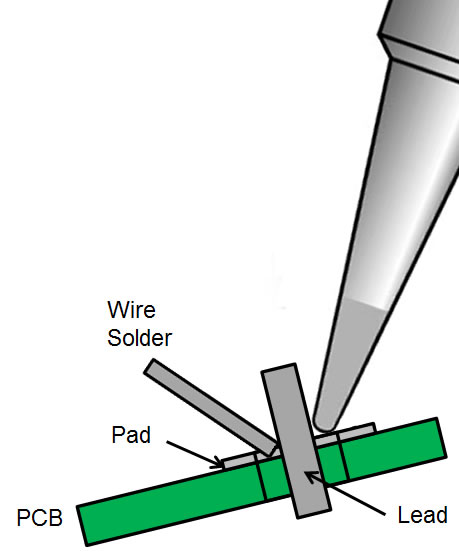
The single biggest mistake most beginners make is trying to melt solder directly onto the iron tip and drop it onto the board like hot glue. That almost always creates a cold joint that snaps off under the slightest stress.
The trick is simple: heat the work, not the solder wire.
Prep the tip: Once your iron hits temperature, touch a tiny drop of fresh solder to the tip. This tinning step creates a liquid bridge that transfers heat instantly when you touch the board.
Heat the joint: Press the flat chisel side of your tip firmly against both the copper pad and the component pin at the same time. Hold it there for about two seconds so both pieces warm up together.
Feed the wire: Push your solder wire directly into the junction between the pin and the pad, opposite from where your iron is resting. If the metal is hot enough, the solder will melt effortlessly and flow around the joint on its own.
Let it cool: Pull the solder wire away first, then lift the iron. Leave the joint alone for a few seconds. Resist the urge to blow on it to cool it faster, because moving the pin while the metal is setting leads to internal micro-fractures.
When you look closely at a good joint, it should look like a neat, shiny little volcano or smooth cone wrapping around the pin. If it looks like a dull grey ball or a giant blob, apply a bit of fresh flux, touch your hot iron back to it for a second, and let it reflow cleanly.
Working with Veroboard: Creating Traces That Actually Hold
When you move from custom PCBs to prototyping on Veroboard or perfboard, you inevitably run into the challenge of linking adjacent pads to form continuous conductive traces. If you’ve ever tried to bridge two pads just by dumping solder on them, you know how frustrating it is when the surface tension keeps snapping the bead back onto individual pins.
There are two main ways to tackle this, depending on how much solder you want to use and how clean you need the board to look.
Method 1: The Stripped Wire Bus (Fast & Solder-Saving)
If you are running longer power rails or ground buses across your board, don't waste half a roll of solder trying to span the gap.

Strip the insulation off a solid-core copper wire (or use trimmed component lead offcuts) and lay it directly along the row of pads where you want your trace. Tacking the wire down at both ends with a tiny dab of solder holds it in place. Once it's anchored, just run your iron along the wire with a small amount of solder. The copper wire acts as a spine, letting the solder flow along it smoothly while saving a ton of material.
Method 2: Pure Solder Traces (The Drag Technique)
If you want to create neat, compact traces without using extra wire, it comes down to timing and tip placement. It feels a bit tricky at first, but once you get the motion into muscle memory, it works like magic.
The secret is positioning your iron tip ahead of the solder wire and dragging them together in one smooth motion:
Place your iron tip onto the starting copper pad first so it heats the metal path.
Feed your solder wire directly behind the moving tip.
Drag both the iron tip and the melted wire slowly along the pads together.

Because the iron leads the way, it preheats the copper surface just milliseconds before the molten solder reaches it. As you move forward, the liquid metal instantly bonds to the freshly heated pad behind the tip and cools quickly into a solid, unbroken bridge.
It takes a little patience to dial in the drag speed, if you move too fast, the bridge breaks; if you move too slow, you get a giant blob, but once you get the rhythm down, you can draw clean, reliable circuit paths across any perfboard layout.
A Few Practical Things I Learned the Hard Way
Always wipe your tip on the brass sponge every few joints. A blackened, oxidized tip repels heat, which forces you to hold the iron against the PCB much longer than you should, risking burnt pads.
Also, get into the habit of trimming through-hole legs right after soldering them. Using flush cutters to snip the excess lead just above the top of the solder cone keeps your board tidy and stops stray wires from shorting against metal enclosures or nearby circuitry.
Also when you are working with valuable sensors like the MLX series Contactless Thermometers or Thermal Cameras, do not heat up one pin after another, take your patience, do one at a time, and try your best to not heat up the complete module too much, which might damage the internal circuitry. I once burnt a 90 USD worth Teensy, I know how painful it is.
If you are setting up your bench for upcoming course projects or hardware builds, drop by


